
How to Split Subtitle Lines in Sublandia Editor
Designed for creators. Free to use. Ready to scale.
Built by subtitlers. Powered by freedom!
Introduction
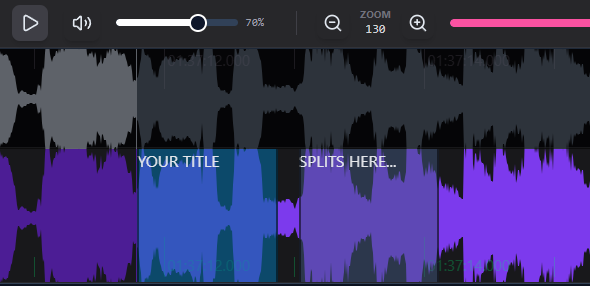
Splitting subtitle lines in Sublandia Editor improves subtitle readability and timing control. Subtitle lines can be divided equally or split at an exact position using the waveform or editor tools.
 Steps to Split Subtitle Lines
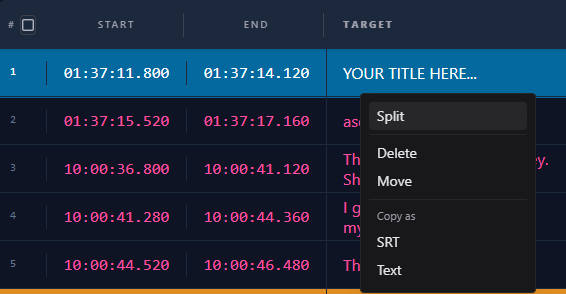
1. Split Subtitle from the Subtitle Table
Select a subtitle in the table, right-click with the mouse, and choose Split. The subtitle line will be divided into two equal parts.
2. Split Subtitle on the Waveform
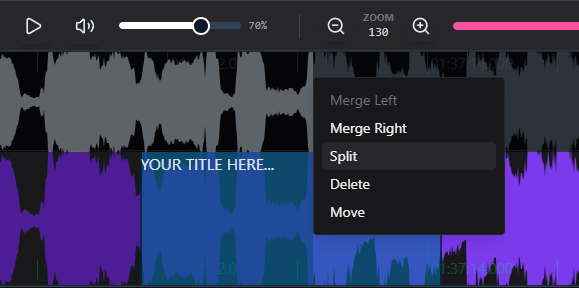
Select a subtitle on the waveform, right-click, and choose Split from the menu. The subtitle will be divided at the mouse position.
3. Use the Split Subtitle Button
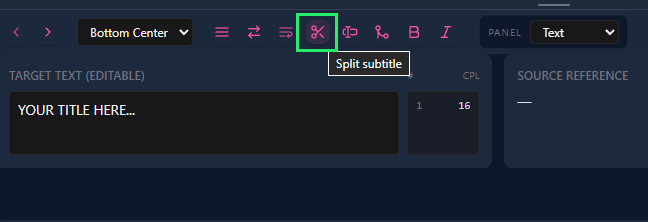
Select a subtitle and click Split Subtitle above the text editor. The subtitle will be split at the cursor position.
Tip
Use subtitle splitting when subtitle text is too long or when subtitle timing needs clearer segmentation.
 FAQ
FAQ
How do I split a subtitle line in Sublandia Editor?
Select the subtitle and use the Split command from the table, waveform menu, or the Split Subtitle button.
Can I split a subtitle exactly at the cursor position?
Yes. Waveform split and split button methods divide the subtitle exactly where the cursor is placed.
What happens when I split a subtitle from the table?
The subtitle is divided into two equal timing segments automatically.
Why should I split subtitle lines?
Splitting improves subtitle readability and allows more precise subtitle timing.
Can split subtitles be edited separately afterward?
Yes. After splitting, both subtitle parts can be edited independently.
Is subtitle splitting important in professional subtitle workflows?
Yes. Subtitle segmentation is essential for readability and timing standards.
Does splitting affect subtitle timing?
Yes. Timing is divided between the new subtitle segments.
Can I undo subtitle splitting?
Yes. Split actions can be undone if needed.
Which split method is most precise?
Splitting on the waveform or using cursor position provides the most precise result.
Can beginners use subtitle split tools easily?
Yes. Sublandia Editor provides intuitive split controls suitable for both beginners and professionals.
Something on your mind?
Contact us
We are social


