
How to Shift All Subtitle Lines at Once in Sublandia Editor
Designed for creators. Free to use. Ready to scale.
Built by subtitlers. Powered by freedom!
Introduction
Global subtitle shifting in Sublandia Editor is used when subtitles are consistently early or late. By selecting all subtitle lines and applying a global offset, you can quickly synchronize the entire subtitle file.

 Steps to Shift All Subtitle Lines
1. Select All Subtitle Lines
Choose one of the following methods:
- Option A: Press Ctrl + Alt + A
- Option B: Click the square above the subtitle row numbers in the subtitle table
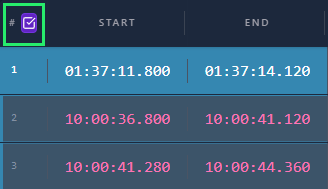
2. Open the Move Command
Right-click with the mouse and select Move from the menu.
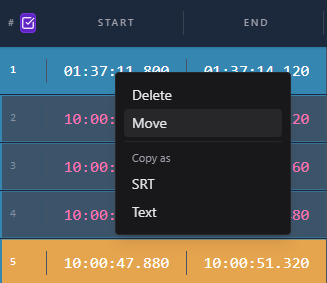
3. Apply Global Subtitle Shift
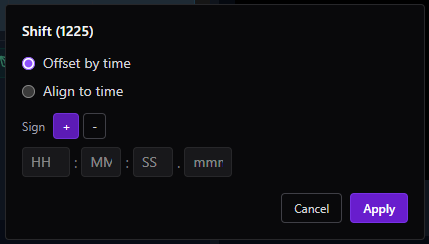
Choose Offset by Time or Align to Time, then enter the desired time value.
- Use + to move subtitles forward
- Use − to move subtitles backward
Click Apply to confirm.
Tip
Use Offset by Time when subtitles are uniformly delayed or early across the entire project.
 FAQ
FAQ
How do I move all subtitle lines at once in Sublandia Editor?
Select all subtitles, open the Move menu, choose Offset by Time or Align to Time, enter the desired value, and click Apply.
What is the difference between Offset by Time and Align to Time?
Offset by Time shifts all subtitles by a fixed amount, while Align to Time moves subtitles so that a selected subtitle starts at a specific target time.
When should I use global subtitle shifting?
Use global shifting when the entire subtitle file is early or late compared to the video.
Can I shift subtitles backward in time?
Yes. Enter a negative value (−) to move subtitles earlier.
Can I shift subtitles forward in time?
Yes. Enter a positive value (+) to delay subtitles.
Does global subtitle shift affect subtitle duration?
No. It changes subtitle position in time but keeps subtitle duration unchanged.
Is global shift useful for subtitle sync correction?
Yes. It is one of the fastest ways to correct subtitle synchronization problems.
Can I undo subtitle shifting if needed?
Yes. Changes can be undone immediately if the result is not correct.
Is global subtitle shifting frame-accurate in Sublandia Editor?
Yes. Time values can be entered precisely for frame-accurate subtitle synchronization.
Is this feature used in professional subtitle workflows?
Yes. Global timing adjustment is a standard professional subtitle editing tool.
Something on your mind?
Contact us
We are social


