
How to Merge Subtitle Lines in Sublandia Editor
Designed for creators. Free to use. Ready to scale.
Built by subtitlers. Powered by freedom!
Introduction
Merging subtitle lines in Sublandia Editor helps create cleaner subtitle structure, improve subtitle readability, and simplify subtitle timing when two subtitle entries should become one.
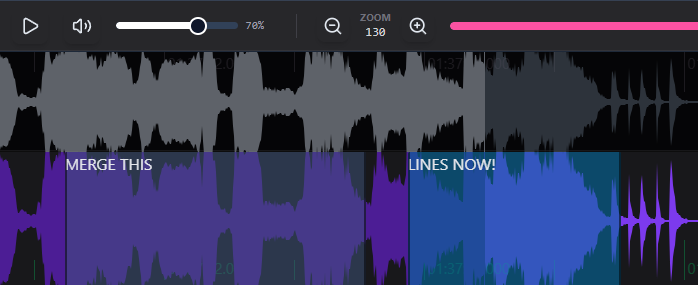
 Steps to Merge Subtitle Lines
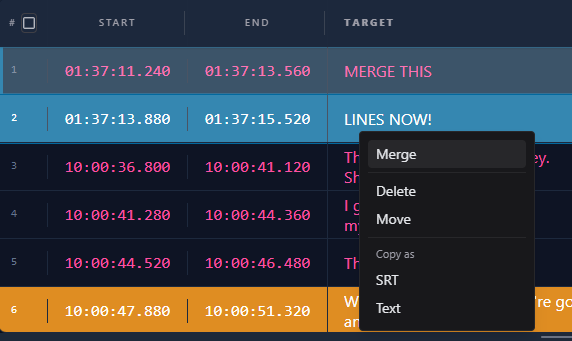
1. Merge Subtitles from the Subtitle Table
Select the subtitle lines in the table, right-click with the mouse, and choose Merge.
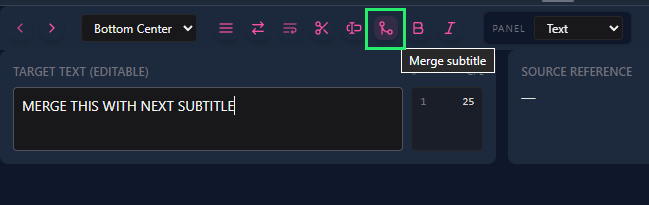
2. Use the Merge Button Above the Text Editor
Select the subtitle you want to merge with the following subtitle, then click Merge above the text editor.
Tip
Use subtitle merging when two short subtitle lines belong to the same sentence or when subtitle timing allows a single readable subtitle block.
 FAQ
FAQ
How do I merge subtitle lines in Sublandia Editor?
Select subtitle lines in the table and use the Merge command, or select one subtitle and click Merge above the text editor.
Can I merge two subtitle lines into one subtitle block?
Yes. Sublandia Editor combines selected subtitle lines into a single subtitle entry.
Does merging subtitles combine subtitle text automatically?
Yes. The subtitle text from both subtitle lines is merged into one subtitle block.
What happens to subtitle timing when subtitles are merged?
The merged subtitle keeps a combined timing range covering both subtitle entries.
When should I merge subtitle lines?
Merge subtitles when short subtitle entries belong to one sentence or when subtitle readability improves as one block.
Can merged subtitles be edited afterward?
Yes. The merged subtitle can be edited like any other subtitle line.
Is subtitle merging used in professional subtitle workflows?
Yes. Subtitle merging helps maintain reading flow and subtitle consistency.
Can I undo a merge operation?
Yes. Merge actions can be undone if necessary.
Does merging affect subtitle reading speed?
It can, so reading speed should always be checked after merging subtitles.
Which method is faster for merging subtitles?
Using the Merge button above the text editor is usually the fastest method for adjacent subtitle lines.
Something on your mind?
Contact us
We are social


